How JavaScript Actually Works: The Event Loop Explained for Humans
Every JavaScript developer uses the event loop. Almost none of them can explain it. Let's fix that — with visuals, code puzzles, and zero hand-waving.
You've written thousands of lines of JavaScript. You use async/await daily. You know that setTimeout doesn't block the page. But if someone asked you to explain why — to draw the event loop on a whiteboard and walk through how a Promise resolves before a setTimeout(..., 0) — could you?
Most developers can't. And that's a problem, because every performance bug, every race condition, and every "why does this execute in the wrong order?" mystery you've ever encountered traces back to one thing: the event loop.
This is the guide I wish I had when I started. No jargon. No hand-waving. Just how JavaScript actually works under the hood.
The Big Paradox
JavaScript is single-threaded. It has one call stack. It can do one thing at a time.
And yet... it handles thousands of simultaneous network requests, renders smooth 60fps animations, responds to mouse clicks, and plays audio — all without freezing.
How?
The answer is that JavaScript is single-threaded, but the environment it runs in (the browser or Node.js) is not. JavaScript delegates work to the environment, and the event loop coordinates when the results come back.
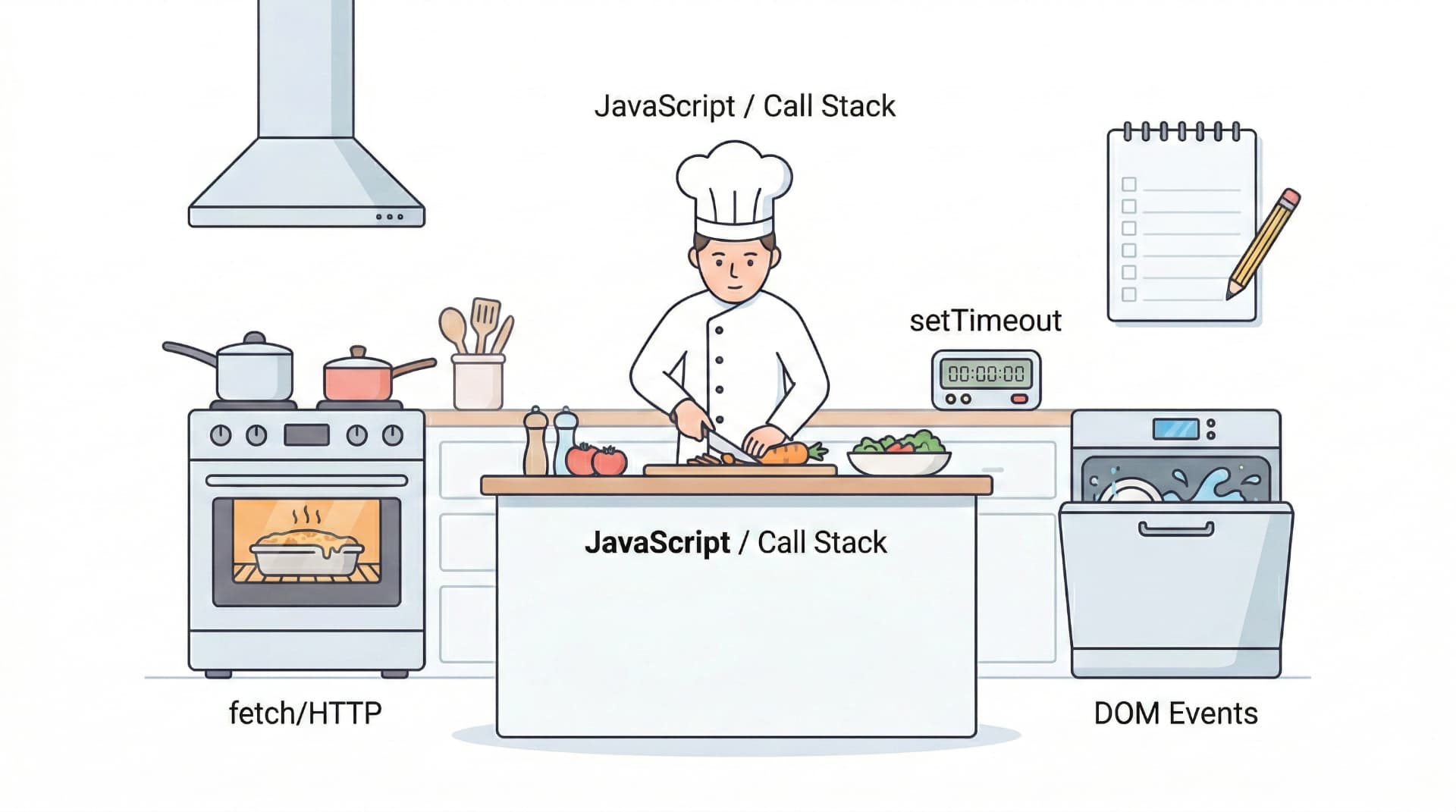
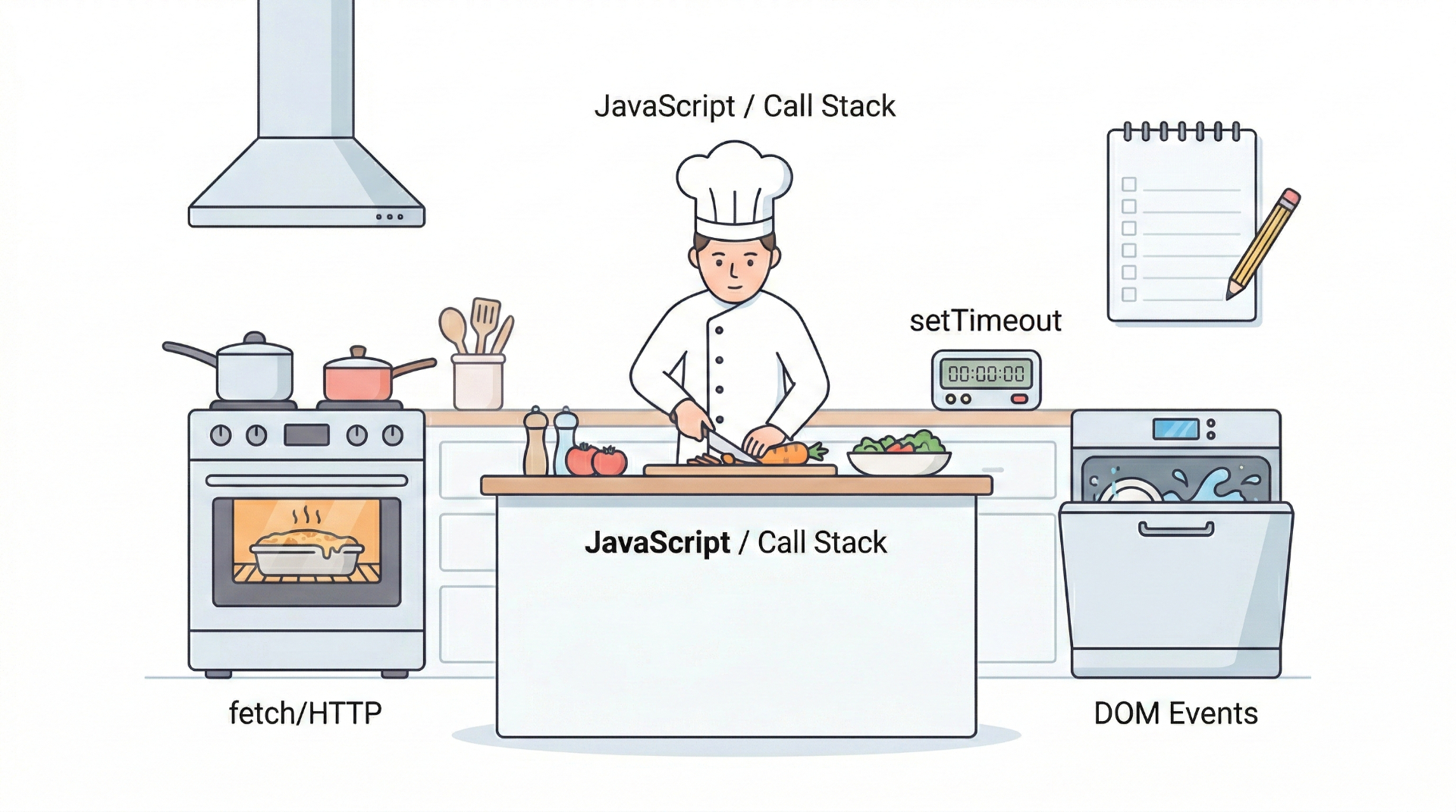
Think of it like a chef in a kitchen. The chef (JavaScript) can only do one thing at a time — chop, stir, plate. But the chef has ovens, timers, and sous chefs (Web APIs) that work in parallel. The event loop is the system that tells the chef "the oven timer just went off — your roast is ready."
Part 1: The Call Stack
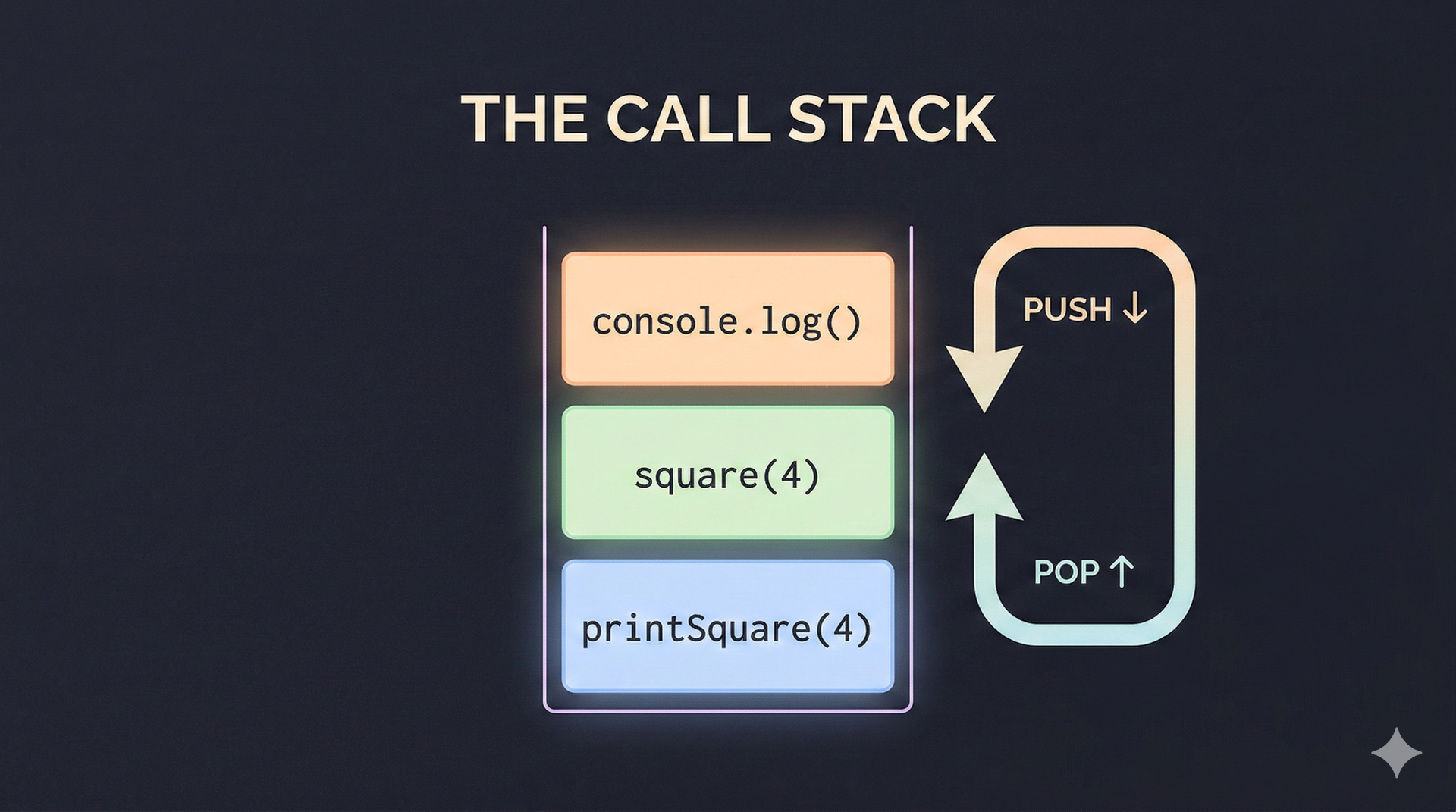
The call stack is JavaScript's to-do list. Every time you call a function, it gets pushed onto the stack. When the function returns, it gets popped off.
javascriptfunction multiply(a, b) {
  return a * b;
}

function square(n) {
  return multiply(n, n);
}

function printSquare(n) {
  const result = square(n);
  console.log(result);
}

printSquare(4);
Here's what the call stack looks like as this runs:
Step 1: [printSquare(4)]
Step 2: [printSquare(4), square(4)]
Step 3: [printSquare(4), square(4), multiply(4, 4)]
Step 4: [printSquare(4), square(4)]          ← multiply returns 16
Step 5: [printSquare(4)]                     ← square returns 16
Step 6: [printSquare(4), console.log(16)]
Step 7: [printSquare(4)]                     ← console.log returns
Step 8: []                                   ← printSquare returns
Functions go in, execute, and come out. Last in, first out. Simple.
But what happens when something takes a long time?
javascript// This blocks EVERYTHING for 5 seconds
function sleep(ms) {
  const start = Date.now();
  while (Date.now() - start < ms) {} // busy wait
}

sleep(5000);
console.log("Finally!");
While sleep() is on the call stack, nothing else can run. The page freezes. Clicks don't register. Animations stop. The browser shows the "page unresponsive" dialog.
This is why we need the rest of the system.
Part 2: Web APIs — JavaScript's Secret Helpers
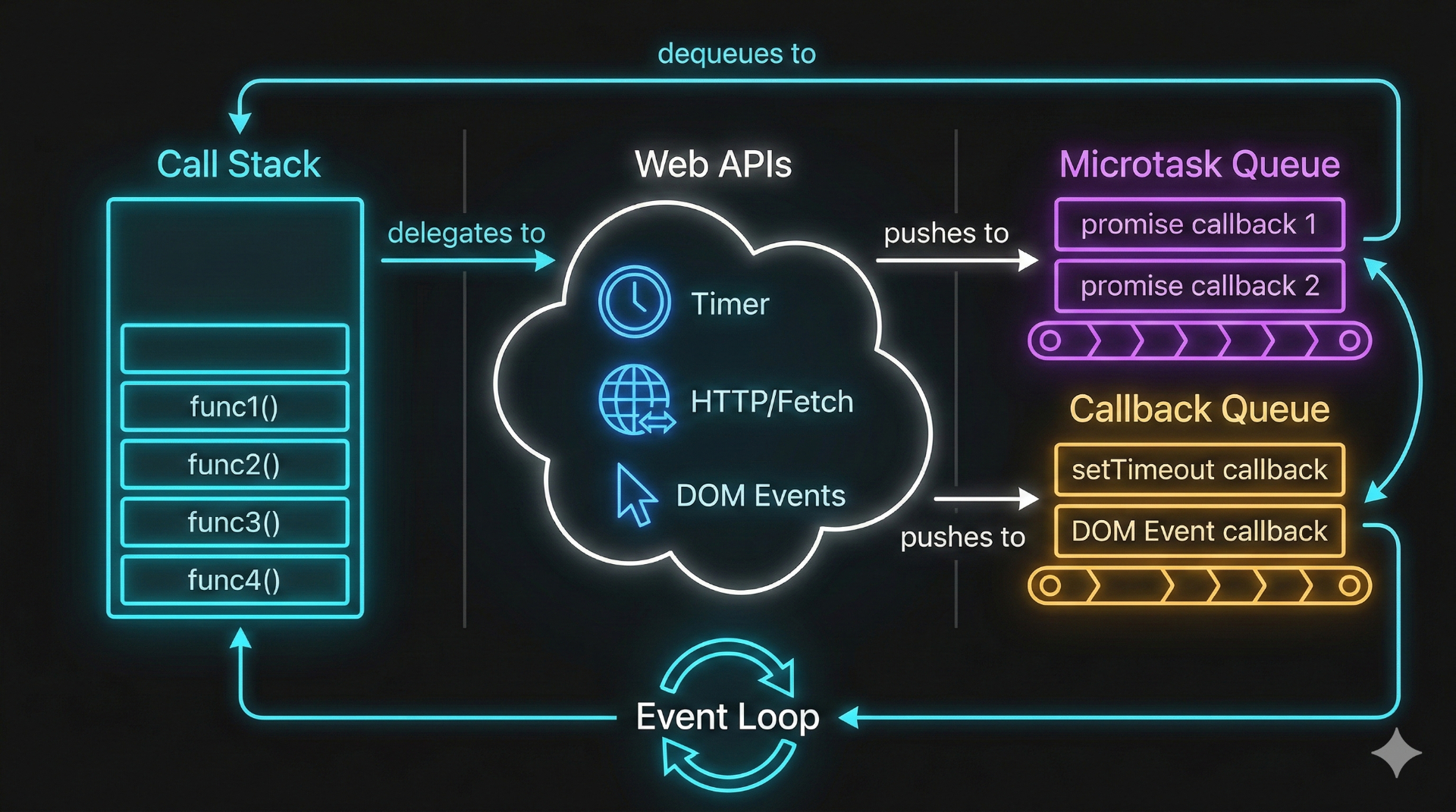
When you call setTimeout, fetch, or addEventListener, JavaScript doesn't handle these itself. It hands them off to Web APIs — built-in browser features that run on separate threads.
javascriptconsole.log("First");

setTimeout(() => {
  console.log("Second");
}, 0);

console.log("Third");
Output:
First
Third
Second
Wait — setTimeout with 0 milliseconds still runs last? Here's exactly what happens:
console.log("First")→ goes on call stack → executes → pops offsetTimeout(callback, 0)→ goes on call stack → hands the callback to the Web API timer → pops off immediatelyconsole.log("Third")→ goes on call stack → executes → pops off- The Web API timer finishes (even 0ms timers wait for the current execution) → moves callback to the Callback Queue
- The event loop checks: "Is the call stack empty? Yes." → moves callback to call stack
console.log("Second")executes
JavaScript never waits. It delegates and moves on.
Part 3: The Two Queues
This is where most people get confused. There isn't one queue — there are two, and they have different priorities.
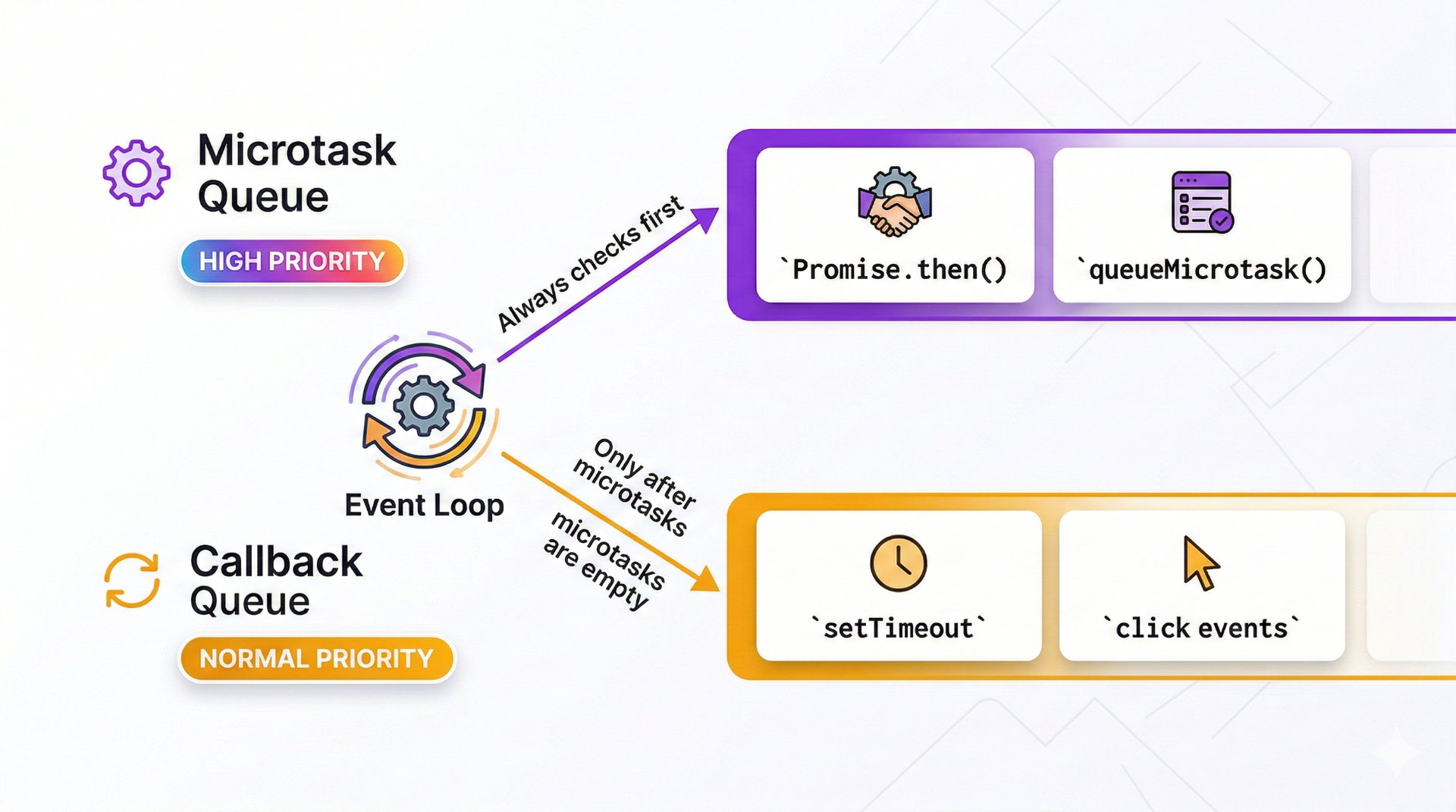
The Microtask Queue (High Priority)
- Promise callbacks (
.then(),.catch(),.finally()) queueMicrotask()MutationObservercallbacks
The Callback Queue / Task Queue (Normal Priority)
setTimeout/setIntervalcallbacks- DOM event handlers (click, scroll, etc.)
requestAnimationFrame(actually its own queue, but similar priority)
The rule: After each task completes, the event loop drains the entire microtask queue before picking up the next task from the callback queue.
This is why Promises always resolve before setTimeout:
javascriptconsole.log("1: Script start");

setTimeout(() => {
  console.log("2: setTimeout");
}, 0);

Promise.resolve().then(() => {
  console.log("3: Promise");
});

console.log("4: Script end");
Output:
1: Script start
4: Script end
3: Promise       ← Microtask runs first!
2: setTimeout    ← Callback runs after all microtasks
Step by step:
console.log("1: Script start")→ executes immediatelysetTimeout(callback)→ sends callback to Web API → timer completes → callback goes to Callback QueuePromise.resolve().then(callback)→ callback goes to Microtask Queueconsole.log("4: Script end")→ executes immediately- Call stack is now empty. Event loop checks Microtask Queue first → runs Promise callback →
"3: Promise" - Microtask Queue is empty. Event loop checks Callback Queue → runs setTimeout callback →
"2: setTimeout"
Part 4: The Event Loop — The Traffic Cop
The event loop is a simple, infinite loop that follows this algorithm:
while (true) {
  1. Execute the current task on the call stack (if any)
  2. When call stack is empty:
     a. Drain ALL microtasks (and any microtasks they create)
     b. Render/paint if needed (browser only)
     c. Pick ONE task from the callback queue
     d. Go to step 1
}
That's it. That's the event loop. The entire magic of JavaScript's concurrency model boils down to this loop checking two queues in the right order.
The Dangerous Part: Microtask Starvation
Because the event loop drains all microtasks before moving to the next task, you can accidentally starve the callback queue:
javascript// ⚠️ This blocks EVERYTHING — the callback queue never gets a turn
function evilLoop() {
  Promise.resolve().then(evilLoop);
}
evilLoop();
Each Promise callback adds another microtask. The microtask queue never empties. The callback queue, render updates, and user interactions are all starved. The page appears frozen.
Part 5: async/await Decoded
async/await isn't magic. It's syntactic sugar over Promises and generators. When you write:
javascriptasync function fetchUser() {
  console.log("A: Before fetch");
  const response = await fetch("/api/user");
  console.log("B: After fetch");
  return response.json();
}

console.log("C: Before call");
fetchUser();
console.log("D: After call");
Output:
C: Before call
A: Before fetch
D: After call
B: After fetch     ← runs later, when the fetch completes
Here's what await actually does:
- Everything before
awaitruns synchronously awaitpauses the function and returns control to the caller- The awaited Promise goes to the Web API (for
fetch) or Microtask Queue - Everything after
awaitis wrapped in.then()and put in the Microtask Queue when the Promise resolves
So await doesn't block JavaScript. It splits the function in half — the before part runs now, the after part runs later.
Part 6: The Ultimate Quiz
Test your understanding. What does this print?
javascriptconsole.log("1");

setTimeout(() => console.log("2"), 0);

Promise.resolve()
  .then(() => {
    console.log("3");
    setTimeout(() => console.log("4"), 0);
  })
  .then(() => console.log("5"));

setTimeout(() => console.log("6"), 0);

console.log("7");
Think about it before scrolling...
Answer:
1
7
3
5
2
6
4
Walkthrough:
| Step | Action | Call Stack | Microtask Queue | Callback Queue |
|---|---|---|---|---|
| 1 | console.log("1") | ✅ runs | — | — |
| 2 | setTimeout(() => "2") | delegates | — | cb("2") |
| 3 | Promise.then() | registers | cb("3") | cb("2") |
| 4 | setTimeout(() => "6") | delegates | cb("3") | cb("2"), cb("6") |
| 5 | console.log("7") | ✅ runs | cb("3") | cb("2"), cb("6") |
| 6 | Stack empty → drain microtasks | — | — | — |
| 7 | console.log("3") | ✅ runs | — | cb("2"), cb("6") |
| 8 | setTimeout(() => "4") inside .then | delegates | cb("5") | cb("2"), cb("6"), cb("4") |
| 9 | console.log("5") (chained .then) | ✅ runs | — | cb("2"), cb("6"), cb("4") |
| 10 | Microtasks empty → pick callback | — | — | — |
| 11 | console.log("2") | ✅ runs | — | cb("6"), cb("4") |
| 12 | console.log("6") | ✅ runs | — | cb("4") |
| 13 | console.log("4") | ✅ runs | — | — |
If you got this right, you understand the event loop better than 90% of JavaScript developers.
Part 7: Real-World Mistakes
Mistake 1: Thinking setTimeout(fn, 0) is instant
It's not instant — it's "as soon as possible after the current task and all microtasks." Under heavy load, the actual delay can be 100ms+.
Mistake 2: Race conditions with shared state
javascriptlet count = 0;

button.addEventListener("click", async () => {
  count++;
  const result = await saveToServer(count);
  display.textContent = `Saved: ${result}`;
  // Bug: if user clicks twice fast, the second click's
  // count++ happens before the first await completes
});
Mistake 3: Blocking the main thread
javascript// ❌ Parsing a huge JSON file blocks everything
const data = JSON.parse(hugeString); // 500ms freeze

// ✅ Move heavy work to a Web Worker
const worker = new Worker("parser.js");
worker.postMessage(hugeString);
worker.onmessage = (e) => { data = e.data; };
Mistake 4: Infinite microtask loops
javascript// ❌ This freezes the page — microtask queue never empties
async function poll() {
  const data = await fetch("/api/data");
  updateUI(data);
  poll(); // immediately creates another microtask
}

// ✅ Use setTimeout to give the callback queue a turn
async function poll() {
  const data = await fetch("/api/data");
  updateUI(data);
  setTimeout(poll, 1000); // goes to callback queue
}
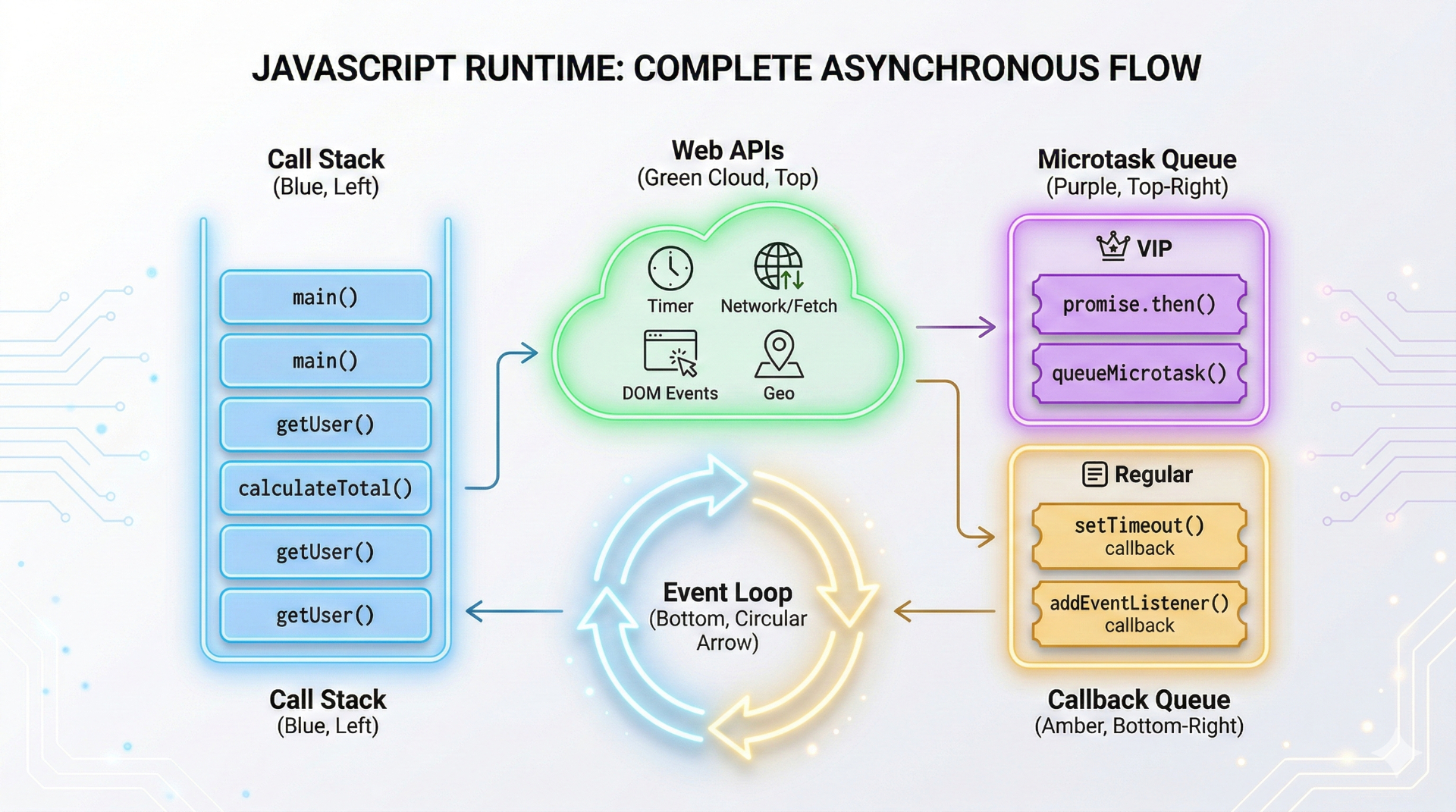
The Mental Model
Here's the simplest way to remember everything:
- Call Stack = What JavaScript is doing right now
- Web APIs = Work happening in the background (not JavaScript)
- Microtask Queue = VIP line (Promises) — always served first
- Callback Queue = Regular line (setTimeout, events) — served when VIP line is empty
- Event Loop = The bouncer who checks: "Stack empty? VIP line first. Then regular line."
Final Thoughts
The event loop is JavaScript's heartbeat. Every setTimeout, every fetch, every click handler, every animation frame — they all flow through this same system.
Understanding it doesn't just make you better at trivia questions in interviews. It makes you:
- Better at debugging — You know why things execute in unexpected orders
- Better at performance — You know what blocks the main thread and how to avoid it
- Better at architecture — You know when to use microtasks vs. macrotasks vs. Web Workers
JavaScript is beautifully simple at its core. One thread, two queues, one loop. Everything else is just the environment doing the heavy lifting.
Now go explain it to someone else. That's how you'll know you truly understand it.
If this article helped clarify events loops for you, follow me for more deep dives into web development fundamentals, AI, and building better software.
Further Reading: