React Server Components vs. Client Components: The Mental Model Shift Every Developer Needs
Understanding the App Router architecture is not just about learning new APIs — it is about fundamentally changing how you think about the frontend.
For years, React developers operated under a simple, comforting assumption: everything runs in the browser. Sure, we had Server-Side Rendering (SSR) with Next.js or Remix, but that was just a neat delivery mechanism. Once the HTML arrived at the browser, React took over, hydrated the entire page, and we were back in our familiar client-side world.
Then came React Server Components (RSC) and the Next.js App Router, and suddenly, the floor dropped out from under us.
"I am seeing confusion everywhere," is a common sentiment in the React community today. The transition from the Pages Router to the App Router is arguably the biggest paradigm shift in the React ecosystem since the introduction of Hooks. It is no longer just about state or lifecycle effects; it is about "where" your code executes.
If you are struggling to grasp when to use a Server Component versus a Client Component, you are not alone. In this comprehensive guide, we are going to break down the architectural differences, explore the mental model shift required to master modern component composition, and look at practical examples that will change how you build web applications forever.
Section 1: The Problem with Traditional React Architecture
To truly appreciate why React Server Components exist, we first need to look at the exact problems they were designed to solve.
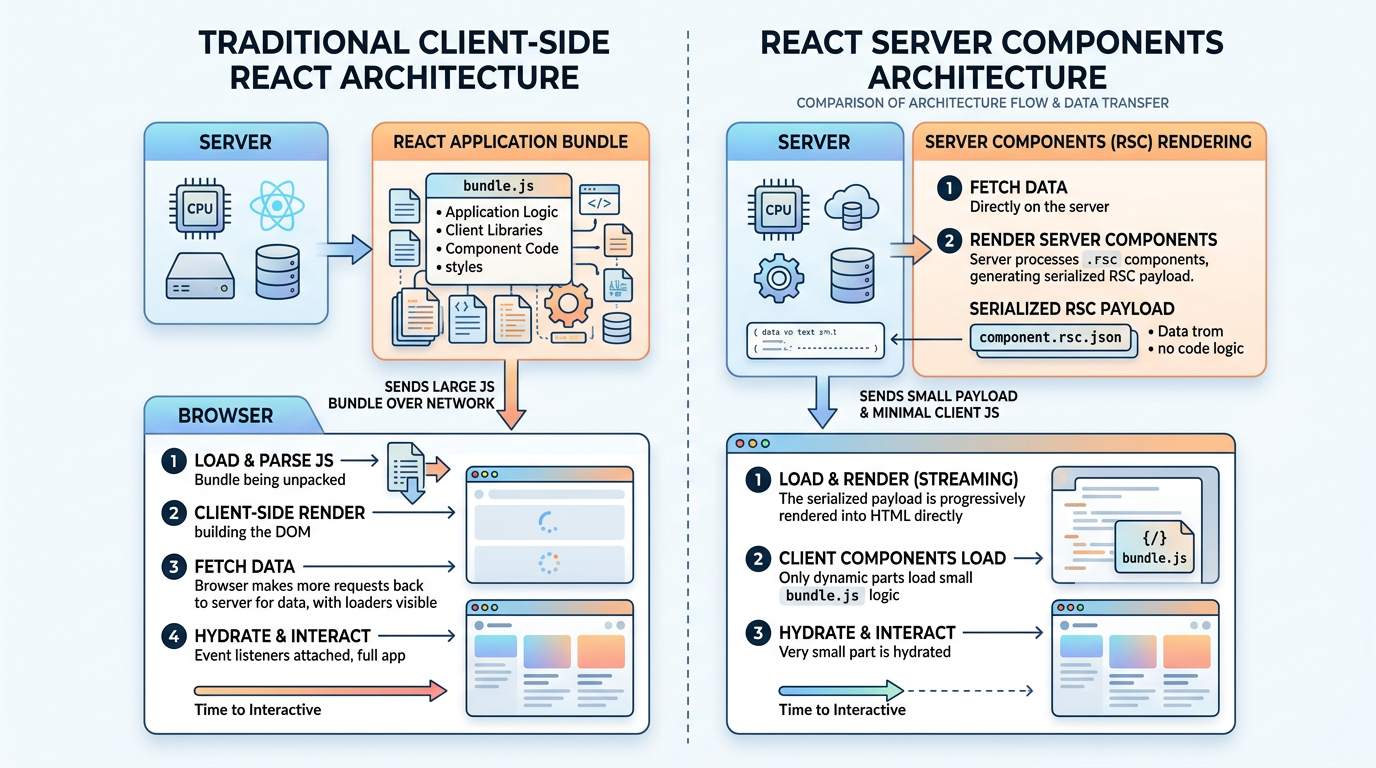
In a traditional Single Page Application (SPA), the browser downloads a massive JavaScript bundle containing your entire application logic. Even with Server-Side Rendering, the server generates the initial HTML layout, but the client still has to download, parse, and execute the entire React component tree to make the page interactive. This attachment of event listeners and state to server-rendered HTML is called hydration.
The traditional hydration model suffers from a few distinct, unavoidable problems:
- Massive Bundle Sizes: Every utility library you import—like a heavy markdown parser or a complex date formatting library—gets sent to the user's device.
- Network Waterfalls: If a child component needs to fetch data, it has to wait until the parent JavaScript is downloaded, executed, and rendered before it can even initiate the API request.
- Wasted CPU Cycles: The client browser ends up repeating rendering work that the server essentially already did, wasting mobile battery life and delaying the Time to Interactive (TTI) metrics.
Imagine ordering a pizza, but instead of the restaurant sending you a hot, ready-to-eat meal, they send you a box of raw ingredients, a recipe book, and an oven, telling you to bake it yourself. That is exactly what traditional client-side React architecture does to your browser. You get the instructions, but your device has to do all the work.
Section 2: Enter React Server Components (RSC)
React Server Components fundamentally change this equation.
Instead of treating the server as just an optional pre-rendering step, RSCs treat the server as a first-class citizen in the React rendering pipeline. Server Components run exclusively on the server. Their underlying JavaScript code is never, ever sent to the browser.
Let that sink in for a moment.
If you import a 100-kilobyte markdown parsing library into a Server Component, your client-side JavaScript bundle size increases by exactly zero bytes. The server does all the heavy lifting, parses the markdown, and sends the finished HTML (along with a special serialized UI format called the RSC payload) directly to the browser.
The Restaurant Analogy Revisited
Let us go back to our pizza analogy to make this concrete.
Traditional SPAs are like a meal-kit delivery service. You receive the raw ingredients, but you have to do the cooking yourself.
Server Components act as the fully staffed restaurant kitchen. The chefs (representing the server infrastructure) do all the chopping, frying, and baking. The waiters (representing the network delivery) bring a finished, ready-to-eat dish straight to your table (the browser).
Client Components, in this analogy, are the interactive condiments securely placed on your dining table. The salt, pepper, and hot sauce. You add them yourself for that final, interactive, personalized touch. You do not need the chefs to add salt for you; that is interactive logic that belongs on the client.
Section 3: Defining the Boundaries
The terminology introduced with the App Router can be slightly confusing at first glance. In the Next.js App Router, all components are Server Components by default. To create a Client Component, you must explicitly add the "use client" directive at the very top of the file.
However, there is a crucial clarification that trips up many experienced developers: Client Components still render on the server during the initial page load.
The "use client" directive does not mean "only render this component on the client browser." It actually translates to "this component requires client-side JavaScript to become interactive." The server still renders the initial HTML for Client Components to provide a fast First Contentful Paint.
Let us break down the exact differences in a detailed comparison table.
| Architectural Feature | Server Components (Default) | Client Components ("use client") |
|---|---|---|
| Execution Environment | Server exclusively | Server (initial layout) + Client execution |
Component State (useState) | ❌ No | ✅ Yes |
Component Lifecycle (useEffect) | ❌ No | ✅ Yes |
Browser Integrations (window) | ❌ No | ✅ Yes |
| Direct Database Access | ✅ Yes | ❌ No |
| Environment Secret Security | ✅ Yes, completely secure | ❌ No, secrets would be exposed |
When to Use Which Paradigm?
As a general rule of thumb, you should leverage Server Components for everything unless you specifically need user interactivity.
Embrace Server Components when:
- Fetching data directly from a relational database or headless CMS.
- Accessing backend ecosystem resources (like local file systems).
- Keeping highly sensitive API keys and access tokens secure from public exposure.
- Rendering static or largely informational UI elements (like footers, navigation links, or blog post content).
- Actively attempting to reduce client-side JavaScript bundle sizes.
Deploy Client Components when:
- Handling immediate interactivity (buttons with custom
onClicklogic or complex form validations). - Managing application state and lifecycle effects (
useState,useReducer,useEffect). - Accessing specific browser-only APIs (like
window.innerWidth,document.getElementById, ornavigator.geolocation). - Interfacing with custom React contexts or external hooks that inherently depend on local state.
Section 4: Practical Application — The Composition Pattern
The biggest hurdle for developers migrating to the App Router is not learning the new toolset; it is learning how to correctly compose these tools together.
You cannot seamlessly import a Server Component directly into a Client Component. If you attempt this, the Next.js compiler will silently convert the Server Component into a Client Component, thereby defeating the entire architectural purpose.
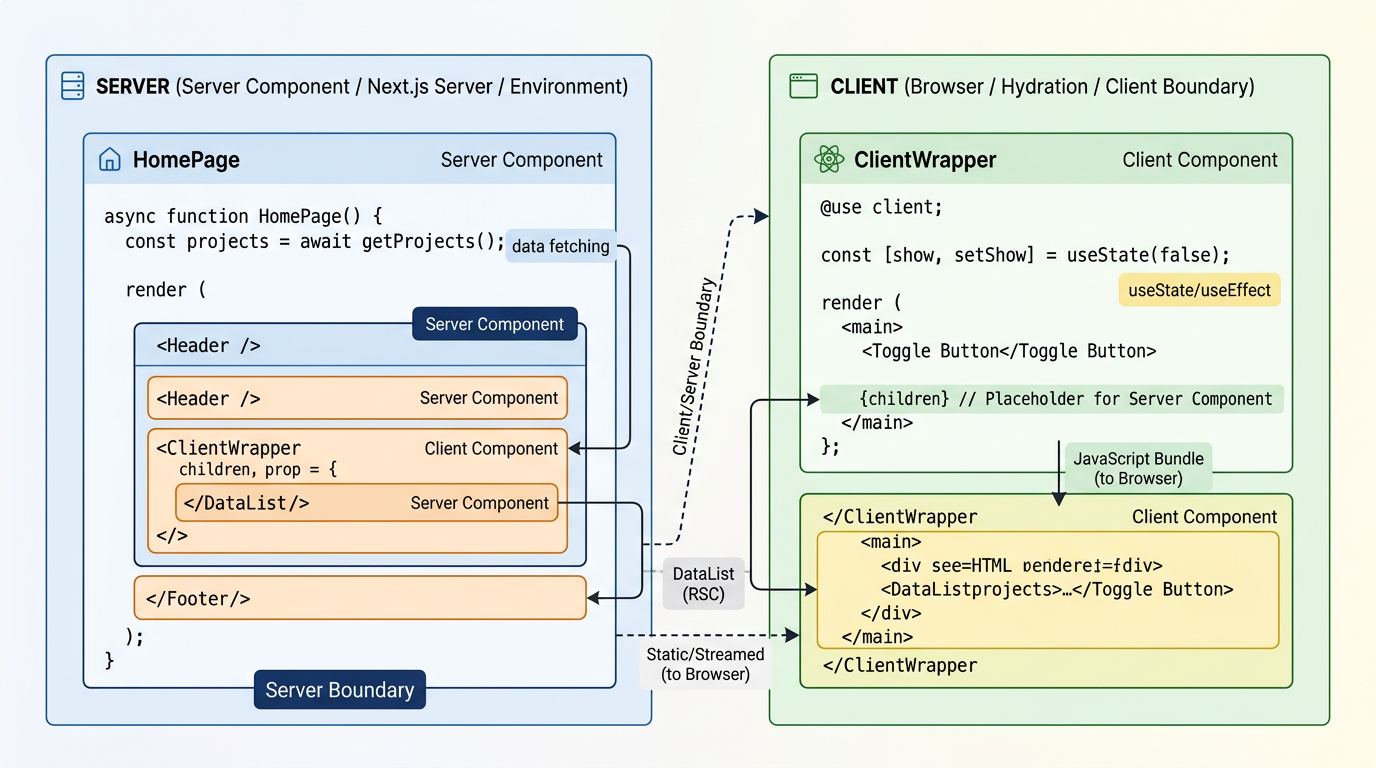
However, you can pass a Server Component as a children prop into a Client Component. This specific technique is known as the composition pattern, and it represents the secret sauce of modern, high-performance React architecture.
Let us examine a highly common scenario. Imagine you have a complex layout that contains an interactive collapsing sidebar and a main content area that needs to fetch secure data from a PostgreSQL database.
Initially, here is the incorrect, instinctual way most developers attempt to build this:
jsx// ❌ BAD PRACTICE: Importing a Server Component into a Client Component
"use client";

import { useState } from "react";
import DashboardContent from "./DashboardContent"; // This was intended to be a secure Server Component!

export default function DashboardLayout() {
  const [isOpen, setIsOpen] = useState(false);

  return (
    <div className="flex-layout">
      <button onClick={() => setIsOpen(!isOpen)}>Toggle Interactive Sidebar</button>
      {isOpen && <SidebarComponent />}

      {/*
        Because DashboardLayout is explicitly a Client Component,
        DashboardContent is forced to execute as a Client Component too!
        Any secure database calls inside of it will now fail or leak secrets.
      */}
      <DashboardContent />
    </div>
  );
}
By structuring the application this way, you have just stripped the DashboardContent component of all its server-side superpowers and security benefits.
Here is the correct, highly optimized approach utilizing the composition pattern:
jsx// ✅ GOOD PRACTICE: Passing Server Components dynamically via props
"use client";

import { useState } from "react";

export default function InteractiveLayout({ children }) {
  const [isOpen, setIsOpen] = useState(false);

  return (
    <div className="flex-layout">
      <button onClick={() => setIsOpen(!isOpen)}>Toggle Interactive Sidebar</button>
      {isOpen && <SidebarComponent />}

      {/* The children components are evaluated and rendered completely independently on the secure server! */}
      <main className="content-area">{children}</main>
    </div>
  );
}
Subsequently, inside your dedicated Server Component page file, you compose them together harmoniously:
jsx// page.js (This remains a Server Component by default)
import InteractiveLayout from "./InteractiveLayout";
import DashboardContent from "./DashboardContent";

export default function AnalyticsPage() {
  return (
    <InteractiveLayout>
      <DashboardContent /> {/* This perfectly retains its Server Component identity! */}
    </InteractiveLayout>
  );
}
In this optimized architectural layout, the DashboardContent component executes entirely within the server ecosystem. It fetches its proprietary data securely, and is then seamlessly passed into the InteractiveLayout component as pre-rendered, lightweight HTML. The end user's browser only has to download the minimal JavaScript block responsible for toggling the sidebar open and closed. Efficiency at its finest.
Section 5: Rethinking Data Fetching and Mutations
In the legacy React ecosystem, fetching data natively on the client forced you to wrestle with loading states, complex error boundaries, and race conditions.
jsx// The legacy, client-side data fetching approach
"use client";

import { useEffect, useState } from "react";

export default function UserProfile({ targetUserId }) {
  const [userProfile, setUserProfile] = useState(null);
  const [isLoading, setIsLoading] = useState(true);

  useEffect(() => {
    fetch(`/api/users/${targetUserId}`)
      .then(response => response.json())
      .then(user => {
        setUserProfile(user);
        setIsLoading(false);
      });
  }, [targetUserId]);

  if (isLoading) return <div>Loading profile data...</div>;
  if (!userProfile) return <div>Error: User profile could not be located.</div>;

  return <div>Welcome back to the dashboard, {userProfile.fullName}!</div>;
}
With the advent of Server Components, data fetching suddenly becomes synchronous (from the perspective of your immediate codebase) and incredibly streamlined. You are essentially empowered to write backend execution logic directly inside your React display components.
jsx// The modern, Server Component data fetching approach
import databaseClient from "@/lib/db"; // Secure, direct database access!

export default async function UserProfile({ targetUserId }) {
  // No loading states, no convoluted useEffect hooks, no frontend hydration waterfalls
  const userProfile = await databaseClient.user.findUnique({
    where: { id: targetUserId }
  });

  if (!userProfile) return <div>Error: User profile could not be located.</div>;

  return <div>Welcome back to the dashboard, {userProfile.fullName}!</div>;
}
This evolution is not merely a syntactical improvement; it is a monumental performance upgrade. The server no longer executes an API call out over the public network; instead, it queries the backend database directly point-to-point.
The public browser never intercepts the database query, never glimpses the database password, and never downloads the raw, unformatted data structure. It only ever receives the flawlessly rendered HTML output. This drastically minimizes the attack surface for potential security vulnerabilities while concurrently improving perceived load times.
Integrating Server Actions
But what about data mutations? Submitting forms has also been reimagined through the introduction of Server Actions. Rather than creating a separate API route destination (/api/submit-data), you simply write an asynchronous function equipped with the "use server" directive and pass it directly to the HTML native action attribute of your form.
jsx// A modern Server Action form submission
import { revalidatePath } from "next/cache";
import databaseClient from "@/lib/db";

export default function UpdateProfileForm() {

  async function handleProfileUpdate(formData) {
    "use server"; // This directive explicitly securely executes only on the server

    const newUsername = formData.get("username");

    // Securely interact with the database directly
    await databaseClient.user.update({
      data: { username: newUsername }
    });

    // Immediately invalidate the cache to show fresh data
    revalidatePath("/profile");
  }

  return (
    <form action={handleProfileUpdate}>
      <input type="text" name="username" required placeholder="Enter new username" />
      <button type="submit">Update Information</button>
    </form>
  );
}
Server Actions allow forms to function entirely without JavaScript enabled on the client browser. They represent a massive boost to overall accessibility and application resilience.
Section 6: Common Mistakes to Avoid
As developers traverse this paradigm shift, several common pitfalls tend to ensnare them.
- Overusing the
"use client"directive: Do not automatically slap"use client"on the root layout file or top-level page components simply because one minor nested component requires state. Push the client boundary as far down the component tree as absolutely possible. Keep the interactive components small and isolated. - Leaking secrets: Be incredibly vigilant that you do not accidentally import secure server files (like
db.jsorstripe-config.js) into Client Components. Consider utilizing the standardserver-onlyutility package to explicitly purposefully fatal-crash the build process if a Server piece is inadvertently imported into a Client environment. - Ignoring caching dynamics: The Next.js App Router aggressively caches fetch requests natively. If your data appears inexplicably "stuck" or stale, you are likely failing to properly configure route segment configs (like
export const revalidate = 0) or utilize cache invalidation techniques (likerevalidateTagorrevalidatePath).
Final Thoughts
The widespread transition toward React Server Components represents far more than a minor framework update; it symbolizes a core foundational shift in how we architect dynamic web applications.
By pushing the intensive, heavy lifting seamlessly to the server infrastructure, we are effectively returning to the foundational roots of the early web while miraculously retaining the declarative, component-based developer experience that made React so globally beloved. Understanding the critical boundary separating Server Components and Client Components is definitively the most essential skill for modern React software engineers.
Stop mentally conceptualizing React as a rigidly client-side-only library. Start actively visualizing your extensive component tree as an interactive gradient, originating securely on the server and progressively injecting localized interactivity as it organically reaches the outer leaves of the tree on the client device. Once this modernized mental model clicks formally into place, the intimidating complexity of the App Router swiftly fades away, revealing a development framework that is remarkably powerful and shockingly elegant.
If you found this technical architectural breakdown helpful, be sure to follow my ongoing resources for more advanced deep dives into modern Next.js scalability and bleeding-edge web development standards.
Further Reading: